Every sub-module independently grants 15 free questions: EPA Core, Type I, Type II, Type III, NATE Core, and each specialty.
⌘ K
Open the app ↗ COMPLETE PRODUCT WALKTHROUGH
Your Roadmap to HVAC Exam Success.
From your first free practice set to exam-day simulations — a clear, screenshot-led guide to every feature, plan, and study tool.
FIRST SCOREAfter 15 questions
✓
PROGRESSSync when signed in
THE FASTEST WAY IN
Your first 10 minutes
Use this sequence to establish a baseline without losing your progress.
- 01Create or sign in
Protect progress across browsers and devices.
- 02Answer 15 questions
Choose any EPA or NATE sub-module.
- 03Read your diagnostic
Turn the focus area into your next study task.
01
Start here
Account & Login
Guest mode works immediately, but signing in is what keeps your progress and purchases available across devices.
You begin as a Guest User
Opening the app puts you in as a Guest User with a “FREE PRACTICE” badge. At this point, practice history exists only in the current browser.
Sign in from Profile
Tap Profile → Login / Register. The “Welcome Back” modal offers email and password, a Forgot Password link, and one-tap Google sign-in.
Log in to sync your progress and restore access.
01Email + passwordIncludes password recovery02Continue with GoogleOne-tap account access
Guest status, Login / Register entry, upgrade cards, and profile utilities.
Email/password sign-in or one-tap Continue with Google.
Clear Exam History
Removes quiz progress only. Your purchased plan is not affected.
Contact Support
Open Profile in the app ↗Use the Profile utility action to reach the support team.
02
Choose your access
Plans & Access Levels
HVAC Exam Master follows a try-before-you-unlock model. Free gives you a meaningful start; Standard opens the bank; Ultimate adds exam-week tools.
| Feature | FREEGuest | STANDARD$14.99 one-time | ULTIMATE$29.99 one-time |
|---|---|---|---|
| Practice questions | First 15 per sub-module | ✓ Full EPA + NATE bank | ✓ Full EPA + NATE bank |
| Answer explanations | Correct answer only | ✓ Full explanations | ✓ Full explanations |
| AI diagnostic | First 15 questions | ✓ Stays active | ✓ Stays active |
| Simulated exams | — | — | ✓ Unlimited mocks |
| PDF library | — | — | ✓ 5–10 downloads |
THE UPGRADE FLOW
What you see after question 15
Question 16 is where free access pauses. From there, you can compare Standard and Ultimate before paying through Stripe.
The free quota lock offers Unlock Standard and See Ultimate.
Standard unlocks the complete question bank and full reasoning.
Ultimate adds simulated exams and the PDF resource library.
STANDARD → ULTIMATE
Upgrade later for only $15 more
Standard owners do not pay $29.99 again. The app recognizes the original $14.99 purchase and offers the $15 difference.
$14.99Standard+$15.00Upgrade=$29.99Total
Compare plans in the app ↗Standard owners see the bridge-price upgrade card in Profile.
The dedicated page confirms the current plan and $15 upgrade.
03
Core workflow
Practicing Questions
The Study Center is the heart of the app: choose a certification track, answer questions, review the result, and save anything worth revisiting.
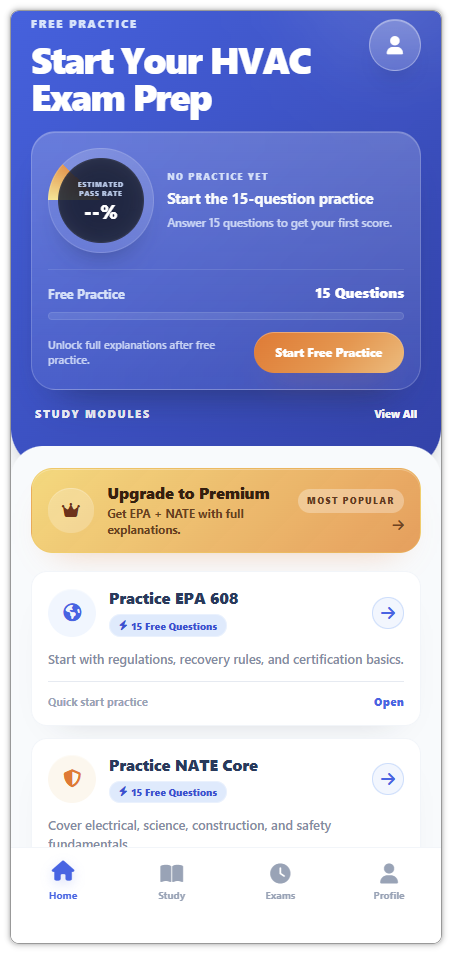
HOME / FREE PRACTICE
Your baseline starts here
The home card combines your plan status, estimated pass rate, free-practice progress, and the next action.
- Pass-rate ring shows “--%” before practice
- 15 questions unlock your first baseline score
- The progress bar tracks the free diagnostic
- The orange button starts the practice set
Estimated pass-rate gauge, free-practice progress, and module shortcuts.
STUDY CENTER
EPA 608 and NATE in one place
Every sub-module card includes 15 free questions, so you can sample each topic before unlocking the full bank.
EPA
Practice EPA 608
Core regulations and certification basics, then Type I small appliances, Type II high-pressure systems, and Type III low-pressure systems.
CoreType IType IIType III
N
Practice NATE Exams
Core Diagnostic across electrical, science, and safety topics, plus Heat Pump, AC / Cooling, and Gas Heating specialties.
CoreHeat PumpACGas Heating
Core, Type I, Type II, and Type III modules.
Core Diagnostic and three NATE specialty tracks.
QUESTION EXPERIENCE
From first answer to focused review
The interface gives immediate feedback, then changes the depth of the review based on your access level.
- 01
Choose an answer
Each question shows four options, progress, and a bookmark star.
- 02
Get instant scoring
Correct turns green. Wrong turns red while the correct option is highlighted.
- 03
Review the reasoning
Free shows the correct answer. Paid access expands the detailed explanation and reference.
- 04
Save and continue
Bookmark the question or use the black Next Question button.
The initial question state.
A correct answer scores instantly.
Free shows the correct answer but locks the full reasoning.
Standard and Ultimate unlock the detailed explanation.
The filled gold star confirms a saved question.
04
Target weak spots
Mistakes & Bookmarks
Two automatic review sets turn ordinary practice into a repeatable correction loop.
★
REVIEW BOOKMARKS
Saved on purpose
Star any question and it appears in a dedicated practice set with the same question interface.
!
REVIEW MISTAKES
Collected automatically
Every incorrect answer is logged. The set starts empty and grows as you practice.
Starred questions are compiled into their own review set.
Wrong answers are collected without manual setup.
05
Exam conditions
Simulated Exams
Simulation Mode recreates the structure and pressure of the real certification tracks. Access is reserved for Ultimate.
EPA Universal, NATE Core, and specialty-track mock exams.
06
Turn scores into action
Score Diagnostics
The pass-rate gauge is only the entry point. After a complete set, the app generates a structured AI review with a clear next study move.
01Complete a set
→Finish the free 15 or a full module.
02Read the score
→Accuracy becomes your new baseline.
03Act on the focus area
Follow the recommended next step.
Standard shows the complete report plus an Ultimate PDF prompt.
REPORT ANATOMY
More than one percentage
- Score ringAccuracy for this run
- Questions analyzedThe data behind this diagnostic
- Diagnostic headlineA plain-language interpretation
- StrongestYour best-performing area
- Focus areaYour weakest priority topic
- Next stepA concrete study recommendation
- Total / Correct / MistakesThe run at a glance
- Bonus anchorLibrary prompt or unlocked status
Ultimate keeps the same report, changes the bonus state, and removes the upgrade button.
07
Exam-week bonus
Resource Library
Ultimate adds a downloadable library for the final stretch: compact study aids designed for printing or quick mobile review.
ULTIMATE MEMBER BONUS
Extra support for exam week
The library lives in Profile and includes downloadable PDFs, answer sheets, checklists, and quick-review packs.
- 5–10 downloadable PDF resources
- Printable exam-week review packets
- Available on mobile and desktop
Unlock with Ultimate$29.99one-timeOpen the app ↗
08
Protect your progress
Data Sync
The difference between Guest and signed-in use is where your history lives — and whether it follows you to the next device.
GUEST USER
Stored in this browser
Practice history, bookmarks, and mistakes remain local. Changing devices or clearing browser data can remove them.
- Current browser only
- No cross-device restore
- Purchase may appear missing until login
SIGNED IN
Tied to your account
Email/password or Google sign-in syncs study progress and restores Standard or Ultimate access.
- Progress follows your account
- Bookmarks and mistakes stay available
- Purchased access can be restored
BEST PRACTICE
Sign in and start practicing ↗Register before your first question.
Keep every answer, bookmark, and diagnostic attached to your account from day one.
09
Appendix
Quick FAQ
The most common product questions, answered without the hunt.
YOU'RE READY
Open HVAC Exam Master ↗Turn the guide into your first score.
Open HVAC Exam Master, sign in, and complete one 15-question practice set.